프로젝트 소스에 DB정보 같은 노출에 위험이 있는 정보는 암호화를 하여 관리한다.
표준프레임워크 3.8 부터 ARIA 블록암호 알고리즘 기반 암/복호화 설정을 간소화 할 수 있는 방법을 제공한다.
globals.properties 설정 파일의 중요 정보 Url, UserName, Password 항목을 암/복호화 처리 할 수 있도록 제공한다.
나는 프로젝트에는 암호화된 값만 넣기 때문에 프로젝트를 따로 만들었다.
처음부터 시작하시는 분들은 참고하시면 좋을 거 같다.
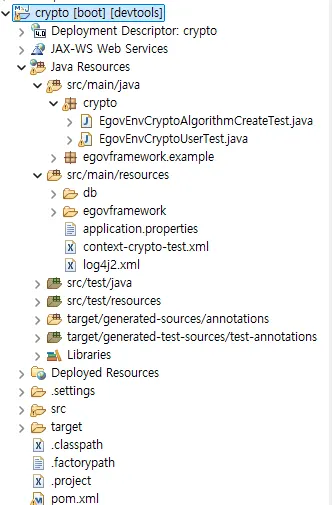
프로젝트 구조는 다음과 같다.
우선 crypto를 사용하기 위해 pom.xml에 추가 해준다.
<!-- crypto -->
<dependency>
    <groupId>org.egovframe.rte</groupId>
    <artifactId>org.egovframe.rte.fdl.crypto</artifactId>
    <version>${org.egovframe.rte.version}</version> <!-- 4.2.0 -->
</dependency>
키 생성 코드 - EgovEnvCryptoAlgorithmCreateTest.java
algorithmKey에 생성할 키를 입력한다.
package crypto;

import org.egovframe.rte.fdl.cryptography.EgovPasswordEncoder;
import org.slf4j.Logger;
import org.slf4j.LoggerFactory;

public class EgovEnvCryptoAlgorithmCreateTest {

	private static final Logger LOGGER = LoggerFactory.getLogger(EgovEnvCryptoAlgorithmCreateTest.class);

	//계정암호화키 키
	//	public String algorithmKey = "(사용자정의 값)";
	public String algorithmKey = "";

	//계정암호화 알고리즘(MD5, SHA-1, SHA-256)
	public String algorithm = "SHA-256";

	//계정암호화키 블럭사이즈
	public int algorithmBlockSize = 1024;

	public static void main(String[] args) {
		EgovEnvCryptoAlgorithmCreateTest cryptoTest = new EgovEnvCryptoAlgorithmCreateTest();

		EgovPasswordEncoder egovPasswordEncoder = new EgovPasswordEncoder();
		egovPasswordEncoder.setAlgorithm(cryptoTest.algorithm);

		LOGGER.info("------------------------------------------------------");
		LOGGER.info("알고리즘(algorithm) : " + cryptoTest.algorithm);
		LOGGER.info("알고리즘 키(algorithmKey) : " + cryptoTest.algorithmKey);
		LOGGER.info("알고리즘 키 Hash(algorithmKeyHash) : " + egovPasswordEncoder.encryptPassword(cryptoTest.algorithmKey));
		LOGGER.info("알고리즘 블럭사이즈(algorithmBlockSize)  :" + cryptoTest.algorithmBlockSize);
	}
}
여기서 나온 algorithmKeyHash 값을 context-crypto-test.xml에 넣는다.
algorithmKey=""
algorithmKeyHash="lkUt8sfQkIl0DL0HUVGRVQGLFR6L2mJ4A+GXocE10e4="
context-crypto-test.xml
<?xml version="1.0" encoding="UTF-8"?>
<beans xmlns="http://www.springframework.org/schema/beans"
	xmlns:xsi="http://www.w3.org/2001/XMLSchema-instance"
	xmlns:egov-crypto="http://maven.egovframe.go.kr/schema/egov-crypto"
	xsi:schemaLocation="http://www.springframework.org/schema/beans http://www.springframework.org/schema/beans/spring-beans.xsd
		http://maven.egovframe.go.kr/schema/egov-crypto http://maven.egovframe.go.kr/schema/egov-crypto/egov-crypto-4.1.0.xsd">

<bean name="messageSource" class="org.springframework.context.support.ResourceBundleMessageSource">
	<property name="useCodeAsDefaultMessage">
		<value>true</value>
	</property>
	<property name="basenames">
		<list>
			<value>classpath:/egovframework/egovProps/globals</value>
		</list>
	</property>
</bean>

<egov-crypto:config id="egovCryptoConfig"
	initial="false"
	crypto="true"
	algorithm="SHA-256"
	algorithmKey=""
	algorithmKeyHash="lkUt8sfQkIl0DL0HUVGRVQGLFR6L2mJ4A+GXocE10e4="
	cryptoBlockSize="1024"
/>
</beans>
암호화 설정하는 코드에 DB 정보를 넣은 후 돌리면 된다.
EgovEnvCryptoUserTest.java
package crypto;

import org.egovframe.rte.fdl.cryptography.EgovEnvCryptoService;
import org.egovframe.rte.fdl.cryptography.impl.EgovEnvCryptoServiceImpl;
//데이터베이스 연결 항목(Url, UserName, Password) 인코딩 값 생성 JAVA
import org.slf4j.Logger;
import org.slf4j.LoggerFactory;
import org.springframework.context.ApplicationContext;
import org.springframework.context.support.ClassPathXmlApplicationContext;

public class EgovEnvCryptoUserTest {

	private static final Logger LOGGER = LoggerFactory.getLogger(EgovEnvCryptoUserTest.class);

	public static void main(String[] args) {

		String[] arrCryptoString = { "",         //데이터베이스 접속 계정 설정
				"",   //데이터베이스 접속 패드워드 설정
				"jdbc:postgresql://ip:port/데이터베이스명?currentSchema=스키마",            //데이터베이스 접속 주소 설정
				"org.postgresql.Driver"  //데이터베이스 드라이버
		};

		LOGGER.info("------------------------------------------------------");
		ApplicationContext context = new ClassPathXmlApplicationContext(new String[] { "classpath:/context-crypto-test.xml" });
		EgovEnvCryptoService cryptoService = context.getBean(EgovEnvCryptoServiceImpl.class);
		LOGGER.info("------------------------------------------------------");

		String label = "";
		try {
			for (int i = 0; i < arrCryptoString.length; i++) {
				if (i == 0)
					label = "사용자 아이디";
				if (i == 1)
					label = "사용자 비밀번호";
				if (i == 2)
					label = "접속 주소";
				if (i == 3)
					label = "데이터 베이스 드라이버";
				LOGGER.info(label + " 원본(orignal):" + arrCryptoString[i]);
				LOGGER.info(label + " 인코딩(encrypted):" + cryptoService.encrypt(arrCryptoString[i]));
				LOGGER.info("------------------------------------------------------");
			}
		} catch (IllegalArgumentException e) {
			LOGGER.error("[" + e.getClass() + "] IllegalArgumentException : " + e.getMessage());
		} catch (Exception e) {
			LOGGER.error("[" + e.getClass() + "] Exception : " + e.getMessage());
		}

	}

}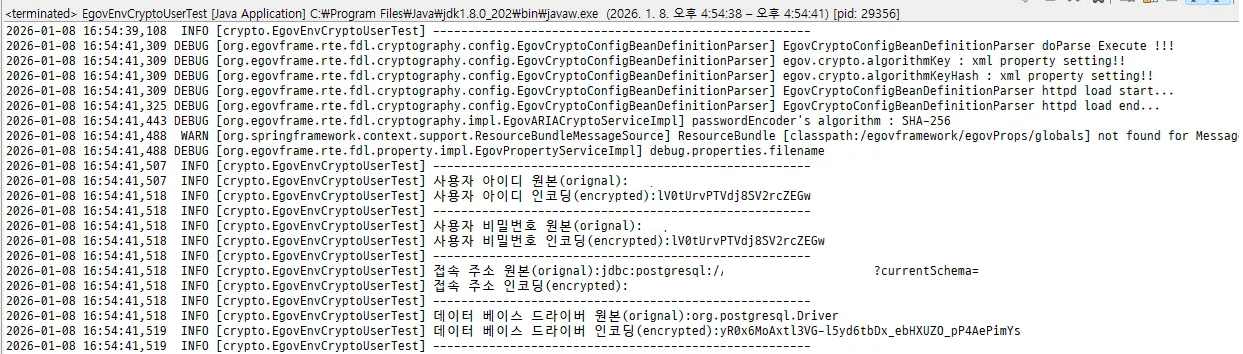
해당 암호화 값을 db 프로퍼티에 설정하면 끝난다. dataSource.properties
#db.driver=org.postgresql.Driver
#db.url=jdbc:postgresql://ip:port/데이터베이스명?currentSchema=스키마
#db.username=
#db.password=
db.driver=yR0x6MoAxtl3VG-l5yd6tbDx_ebHXUZO_pP4AePimYs
db.url=
db.username=lV0tUrvPTVdj8SV2rcZEGw
db.password=lV0tUrvPTVdj8SV2rcZEGw
참고
https://www.egovframe.go.kr/wiki/doku.php?id=egovframework:rte2:fdl:crypto_simplify_v3_8
'Backend > Spring' 카테고리의 다른 글
| [Spring] WebFlux 초기 설정 (0) | 2024.11.18 |
|---|---|
| [Spring] MyBatis 댓글 목록 들여쓰기 구현 (0) | 2023.03.03 |
| [Spring] JdbcTemplate (0) | 2023.02.17 |
| [Spring] MVC 게시판(5) 글 삭제 (0) | 2023.02.17 |
| [Spring] MVC 게시판(4) 상세페이지 (0) | 2023.02.17 |