메인 액티비티에서 버튼을 누르면 서브 액티비티를 시작
->
서브 액티비티에서 문자열을 입력하고 '입력완료'버튼을 누르면 서브 액티비티는 문자열을 메인 액티비티로 전달한 후에 종료
->
메인 액티비티에서는 이 문자열을 받아서 텍스트 뷰를 통하여 화면에 표시
- 사용자가 입력한 문자열을 받아서 메인 액티비티에 반환하는 서브 액티비티를 작성
- 문자열을 입력받는 대화상자처럼 동작
- 메인 액티비티를 작성하고 이어서 서브 액티비티르 작성
- 각 액티비티별로 사용자 인터페이스를 별도로 작성하여야 하며 매니페스트 파일도 변경
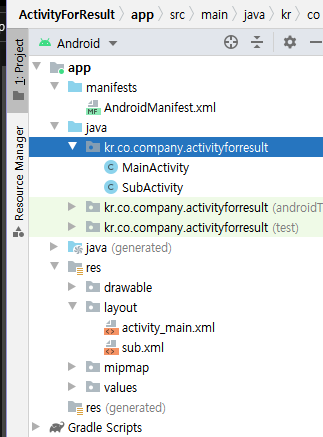


activity_main.xml
<?xml version="1.0" encoding="utf-8"?>
<LinearLayout xmlns:android="http://schemas.android.com/apk/res/android"
    android:layout_width="match_parent"
    android:layout_height="match_parent"
    android:orientation="vertical">

    <Button
        android:id="@+id/button"
        android:layout_width="match_parent"
        android:layout_height="wrap_content"
        android:text="서브 액티비티로부터 문자열 반환받기">
    </Button>
    <TextView
        android:id="@+id/textView1"
        android:layout_width="wrap_content"
        android:layout_height="wrap_content"
        android:text="반환된 문자열">
    </TextView>
    <TextView
        android:id="@+id/text"
        android:layout_width="match_parent"
        android:layout_height="wrap_content"
        android:text="This is a test">
    </TextView>
</LinearLayout>
sub.xml
<?xml version="1.0" encoding="utf-8"?>
<LinearLayout xmlns:android="http://schemas.android.com/apk/res/android"
    android:layout_width="match_parent"
    android:layout_height="match_parent"
    android:orientation="vertical">

    <EditText
        android:id="@+id/edit"
        android:layout_width="match_parent"
        android:layout_height="wrap_content">
        <requestFocus></requestFocus>
    </EditText>

    <LinearLayout
        android:id="@+id/linearLayout1"
        android:layout_width="match_parent"
        android:layout_height="wrap_content"
        android:layout_gravity="center">

        <Button
            android:id="@+id/button_ok"
            android:layout_width="wrap_content"
            android:layout_height="wrap_content"
            android:text="입력완료">
        </Button>
        <Button
            android:id="@+id/button_cancel"
            android:layout_width="wrap_content"
            android:layout_height="wrap_content"
            android:layout_weight="1"
            android:text="취소">
        </Button>
    </LinearLayout>
</LinearLayout>
AndroidManifest.xml
<?xml version="1.0" encoding="utf-8"?>
<manifest xmlns:android="http://schemas.android.com/apk/res/android"
    package="kr.co.company.activityforresult">

    <application
        android:allowBackup="true"
        android:icon="@mipmap/ic_launcher"
        android:label="@string/app_name"
        android:roundIcon="@mipmap/ic_launcher_round"
        android:supportsRtl="true"
        android:theme="@style/Theme.ActivityForResult">
        <activity android:name=".MainActivity">
            <intent-filter>
                <action android:name="android.intent.action.MAIN" />

                <category android:name="android.intent.category.LAUNCHER" />
            </intent-filter>
        </activity>

        <activity
            android:name=".SubActivity"
            android:label="SubActivity">
        </activity>

    </application>

</manifest>
MainActivity.java
package kr.co.company.activityforresult;

import androidx.appcompat.app.AppCompatActivity;

import android.content.Intent;
import android.os.Bundle;
import android.view.View;
import android.widget.Button;
import android.widget.TextView;

public class MainActivity extends AppCompatActivity {
    static final int GET_STRING = 1;
    TextView text;

    @Override
    protected void onCreate(Bundle savedInstanceState) {
        super.onCreate(savedInstanceState);
        setContentView(R.layout.activity_main);

        Button button = (Button) findViewById(R.id.button);
        text = (TextView) findViewById(R.id.text);
        button.setOnClickListener(new View.OnClickListener() {
            @Override
            public void onClick(View v) {
                Intent in = new Intent(MainActivity.this, SubActivity.class);
                startActivityForResult(in, GET_STRING);
            }
        });
    }

    @Override
    protected void onActivityResult(int requestCode, int resultCode, Intent data){
//        super.onActivityResult(requestCode, resultCode, data);

        if(requestCode == GET_STRING){
            if(resultCode == RESULT_OK){
                text.setText(data.getStringExtra("INPUT_TEXT"));
            }
        }
    }
}
SubActivity.java
package kr.co.company.activityforresult;

import android.content.Intent;
import android.os.Bundle;
import android.view.View;
import android.widget.Button;
import android.widget.EditText;
import android.widget.TextView;

import androidx.appcompat.app.AppCompatActivity;

public class SubActivity extends AppCompatActivity {
    EditText edit;

    @Override
    protected void onCreate(Bundle savedInstanceState) {
        super.onCreate(savedInstanceState);
        setContentView(R.layout.sub);

        edit = (EditText) findViewById(R.id.edit);
        Button button_ok = (Button) findViewById(R.id.button_ok);
        button_ok.setOnClickListener(new View.OnClickListener() {
            @Override
            public void onClick(View v) {
                Intent intent = new Intent();
                intent.putExtra("INPUT_TEXT", edit.getText().toString());
                setResult(RESULT_OK, intent);
                finish();
            }
        });

        Button button_cancel = (Button) findViewById(R.id.button_cancel);
        button_ok.setOnClickListener(new View.OnClickListener() {
            @Override
            public void onClick(View v) {
                setResult(RESULT_CANCELED);
                finish();
            }
        });
    }
}'Programming > Mobile' 카테고리의 다른 글
| [안드로이드스튜디오] 서비스와 방송수신자 (0) | 2021.10.03 |
|---|---|
| [안드로이드스튜디오] 인텐트 (0) | 2021.09.19 |
| [안드로이드스튜디오] 여러페이지로 구성된 애플리케이션 작성 (0) | 2021.09.12 |
| [안드로이드스튜디오] 명시적 인텐트 - 두개의 액티비티로 이루어진 애플리케이션 (0) | 2021.09.11 |
| [안드로이드스튜디오] 액티비티 (0) | 2021.09.11 |